SMS Opt-In Best Practices Guide
This document provides recommendations and best practices for setting up an SMS opt-in process that is AWS and carrier compliant, ensuring your number registration is approved smoothly.
Written By Max Guerrero
This setup is required to use SMS based alerts and notifications in Korbyt. Additional articles for how this can be used can be found here:
- https://korbyt.featurebase.app/en/help/articles/7242953-managing-urgent-alerts
- https://korbyt.featurebase.app/en/help/articles/0396369-settings-in-the-content-management-system-cms
1. Why Opt-In Compliance Matters
Carriers and AWS require explicit end-user consent before SMS can be sent.
Applications are reviewed by third-party compliance reviewers. If the opt-in process is unclear, incomplete, or non-compliant, your registration may be denied or delayed.
Following the guidelines below ensures faster approval, fewer spam complaints, and long-term deliverability.
2. Core Opt-In Requirements
At the point of opt-in (web form, app, printed form, or verbal script), you must display the following:
Program / Brand Name
Clearly identify who is sending the SMS (your company name or program name).Message Frequency Disclosure
Examples:“Message frequency varies” (for OTP/alerts)
“Up to 4 msgs/month” (for campaigns)
Support Contact Information
Example: “Text HELP for help, call 1-800-123-4567, or email support@yourbrand.com.”Opt-Out Instructions
Example: “Text STOP to opt-out at any time.”Rates Disclosure
Must use exact wording: “Message and data rates may apply.”Terms & Conditions Link
Publicly accessible link to SMS-specific Terms.Privacy Policy Link
Publicly accessible link with clear statement that SMS opt-in data is not shared with third parties.
3. Recommended Opt-In Methods
Web / App Form (Preferred)
Capture the phone number in a required field.
Display all required disclosures at the point of entry.
Include a required checkbox confirming explicit consent.
Example Consent Text:
“I consent to receive SMS messages from {Brand Name}. Message frequency varies. Message and data rates may apply. Reply STOP to cancel, HELP for help. For support, call 1-800-123-4567 or email support@brand.com. See our Terms & Conditions and Privacy Policy.”
Verbal Opt-In (Call Center / In-Person)
Read the entire disclosure script, including STOP/HELP and rates language.
Provide Terms & Privacy Policy URLs verbally.
Record timestamp + script acknowledgment for audit purposes.
Printed Form / Event Sign-Up
Printed disclosure must include all the required elements above.
Retain copies for proof of consent.
4. Double Opt-In (Best Practice)
Some carriers (esp. for marketing or abandoned cart use cases) require a double opt-in. This reduces complaints and increases approval chances.
Example Flow:
User submits number via form.
Automated SMS:
“{Brand Name}: Reply YES to confirm your subscription. Msg&data rates may apply. STOP to cancel, HELP for help.”
Only activate subscription after they reply YES.
5. Recordkeeping & Evidence
For compliance and audit readiness, maintain:
Phone number and timestamp of consent.
Method of opt-in (web form, event, verbal script).
Screenshot or copy of the disclosure text shown.
Logs of double opt-in replies (if used).
You will need to submit screenshots and/or links of your opt-in form or flow during AWS number registration.
6. HELP & STOP Keyword Requirements
STOP: Must immediately unsubscribe the user and confirm via SMS.
“You are unsubscribed from {Brand Name}. No more messages will be sent. Reply HELP for help.”
HELP: Must respond with program name + support contact details.
“{Brand Name}: For help, call 1-800-123-4567 or email support@brand.com. Msg&data rates may apply.”
Carriers test this during review, so it must be live and working.
7. Common Reasons for Rejection
Missing or vague program/brand name.
No Terms & Conditions or Privacy Policy links.
Opt-in form not publicly accessible (reviewers cannot see it).
Failure to disclose STOP/HELP instructions.
Privacy Policy allowing third-party data sharing.
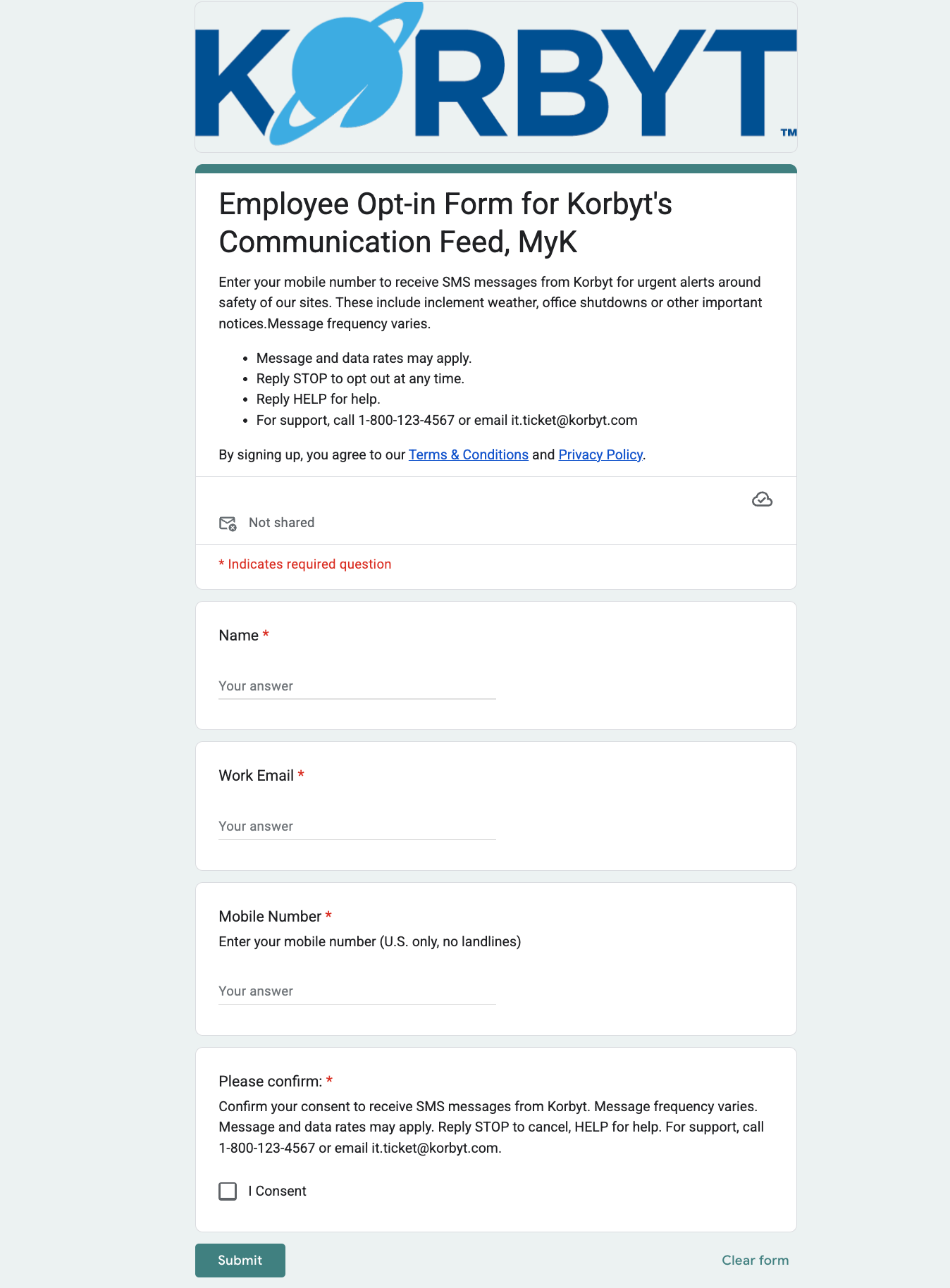
8. Example Setup with Google Forms (Quick Start)
Create a new Google (or Microsoft!) Form
Question 1: Mobile Number (required).
Question 2: Consent Checkbox (required). Text:
“I consent to receive SMS messages from {Brand Name}. Message frequency varies. Message and data rates may apply. Reply STOP to cancel, HELP for help. For support, call 1-800-123-4567 or email support@brand.com.”
Add links to Terms & Privacy in the description.
Export responses for proof of consent.
Take a screenshot and provide the public form link for registration.
Summary
To ensure your AWS number registration is approved quickly:
Always include required disclosures (Brand, Frequency, STOP/HELP, Rates, Terms, Privacy).
Use clear and accessible opt-in methods (preferably web forms).
Strongly consider double opt-in to reduce risk.
Store proof of consent for audits and submit as evidence during registration.
Test HELP/STOP functionality before going live.
Following these best practices will help you pass carrier review the first time and maintain a trusted, compliant SMS program.
Still need help? Share an idea