Tenat Admin for Mobile & Web to apply itself when setting folder permissions
Suggesting an improvement for a uniform experience by having Tenant Administrator Mobile and Web apply itself without needing to be checked similar to other Tenant Admin groups.
Details
When applying folder permissions, there are multiple Tenant Administrator groups. The Tenant Admin for Email and Tenant Admin for Desktop apply themselves without needing to be checked, but the Tenant Admin for Mobile and Web does not, causing an error. I suggest that all groups either visually check themselves if they are going to apply or that the Mobile and Web Tenant Admin follow the same logic as the others and apply themselves without causing an error so that the experience is uniform.
After turning off Global access, you can see that Tenant Admin Signage is the only group that applies the check to itself
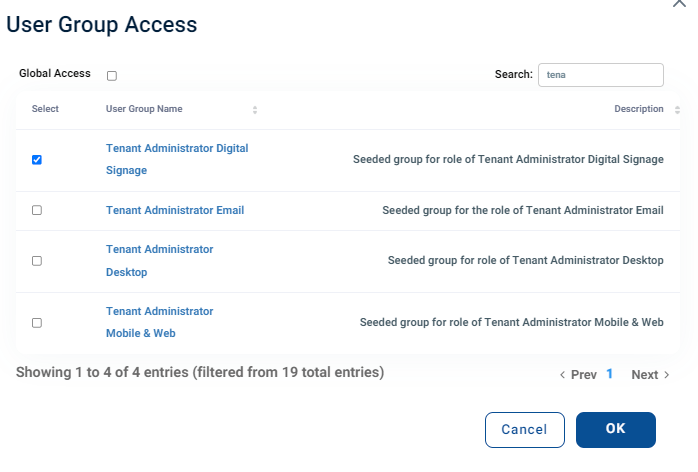
When hitting OK, Mobile & Web not being checked causes an error and needs to be checked as well. The system accepts Email and Desktop not being checked.
Once applied, in the text tool tip when overing over the padlock, there are also several Tenant Administrator groups that have applied themselves without being checked or even listed.
I would suggest that Tenant Administrator for Mobile & Web should act like those other groups to create a more uniform experience by applying itself
- Product Area
- Korbyt Signage
Log in to comment and vote
No comments yet
Be the first to share your thoughts.